 Maxim DevLab

PeekHUD
Peek at your stats — lightweight & instant hardware telemetry overlay for PC gamers and power users.
 GitHub Releases ↗
Overview
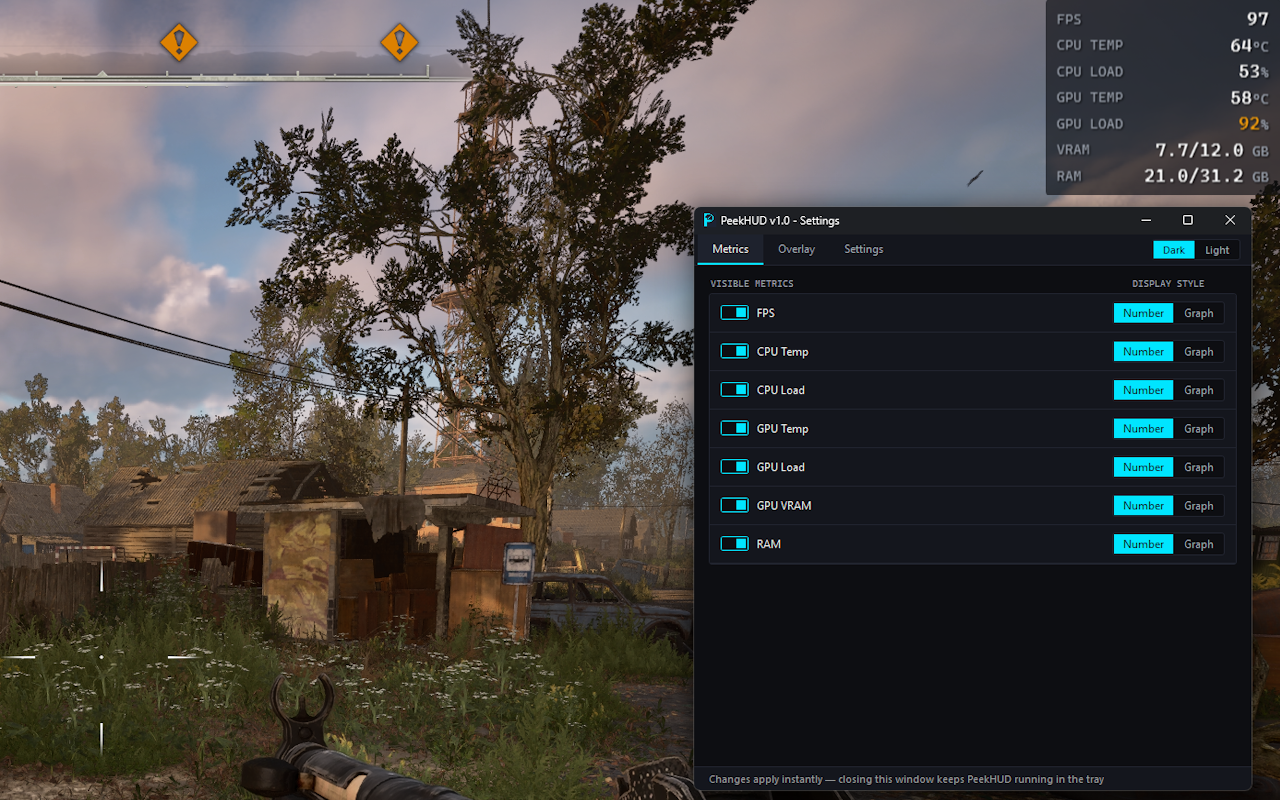
PeekHUD is a lightweight, standalone hardware overlay HUD for PC gamers and power users built on .NET 8 WPF. It delivers real-time, low-overhead system telemetry without the need for heavy background suites, background services, or forced online accounts.
Designed to be clean, distraction-free, and responsive, PeekHUD provides instant readouts for your framerate, CPU/GPU utilization, temperatures, and memory stats. Whether you are benchmarking, gaming, or monitoring heavy workloads, PeekHUD keeps your vital metrics visible at a glance.
How It Started
I’ve tested countless hardware overlays over the years, and most either try to do way too much or don’t do nearly enough. The built-in Steam overlay is great and lightweight, but it only displays FPS when I actually want to keep an eye on thermals and clock loads. On the other end, utilities like MSI Afterburner feel cluttered with confusing menus and bundle GPU overclocking tools that I neither want nor need. I built PeekHUD to hit that exact sweet spot: a clean, lightweight telemetry HUD that serves its single purpose flawlessly without getting in your way.
Key Features
Low-Overhead Telemetry
Direct sensor polling via LibreHardwareMonitorLib and framerate tracking via ETW TraceEvent for minimal performance impact.
Core Metrics
Real-time monitoring of FPS, CPU Temp/Load, GPU Temp/Load, VRAM usage, and System RAM.
Customizable HUD
Switch between numeric readouts and micro-graphs. Customize HUD positioning, scaling, and background opacity.
Themes & Color Styling
Ships with a high-contrast dark mode and electric cyan accents by default, plus full Dark/Light theme switching and custom color pickers for every metric.
Task Scheduler Startup
Run automatically at Windows boot minimized to the system tray with zero annoying UAC prompts.
No Accounts or Clutter
No mandatory sign-ups, no background telemetry, and no heavy unnecessary background services.
Global Hotkey Toggle
Instantly hide or show the HUD in-game using a customizable shortcut (default Ctrl+Shift+F).
Dynamic Warning Alerts
Metrics automatically shift to amber or red when temperatures, loads, or FPS hit custom thresholds.
100% Local & Private
Runs completely offline on your machine with zero network requests or telemetry collection.
Technical Information
| Framework | C# / .NET 8 (WPF) |
|---|---|
| Monitoring Engines | LibreHardwareMonitorLib, Microsoft.Diagnostics.Tracing.TraceEvent |
| Compatibility | Windows 10 / Windows 11 (64-bit) |
| Privileges | Administrator (required to query hardware sensors and ETW frame sessions) |
| Installer | Inno Setup 7 |
| Source & Repository | github.com/maximd7/PeekHUD |
| Privacy | 100% offline and local. Does not collect, track, or transmit any user data or telemetry. |